Notes # 23: Am I Disabled Or A Robot?
Created while listening: Jorja Smith – What Are The Odds
Personal Notes
Let me tell you the least accessible process in the world: Visa Application. I am trying to book an appointment for a Schengen visa for Spain. The process is operated by BLS International. I will not mention screen reader accessibility issues, time-consuming procedures, or cognitive overload. I just want to show you a screenshot.
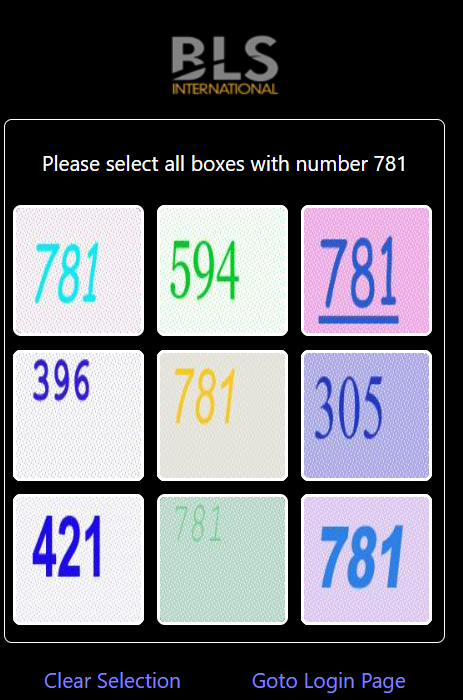
I am partially sighted and I cannot see colors very well. My contrast perception is horrible. So, why are you expecting me to see light gray '781' on a white background? I come across this CAPTCHA verification at almost every step. I don’t want to struggle with it, dear Spain. Not having 'normal' vision does not mean I am a robot.
News
Estonia Pushes 112 Accessibility Deadline To 2027 As Service Falls Short
Source: ERR News
In terms of the accessibility of 112 emergency call services, video calling is a need for the sign language-speaking Deaf community. Also, Real-Time Text technology provides more instant and accurate service compared to SMS for persons who prefer texting to speaking, which is mainly beneficial for people with speech disabilities and the hard-of-hearing community. These accessibility regulations were introduced into law under the European Accessibility Act in 2022. However, Estonia could not meet the 2025 deadline and stated that 112 services will become fully accessible in 2027.
Purdue Launches New Accessibility App That Converts Handwritten Text To Compliant HTML
Source: Purdue University
Professors from Purdue University developed the Ink2html app to convert handwritten text into an accessible HTML document with the help of AI. The article gives details about the project and AI implementation. This is a very simple and effective solution that a university can apply for disabled students in the AI era. This kind of Ink2html project can also be beneficial for ADA Title II compliance for governments, because they also have many inaccessible images and documents in their websites.
Putting Sign Language AI Into Users’ Hands
Source: Google Deepmind
Google has introduced a sign-language-to-text (SL2T) translation model that powers sign-to-text dictation in Gboard and Live Transcribe on Pixel 11 with American Sign Language (ASL) to English. More devices are coming soon, and additional languages will follow. In the blog article, I highly recommend that you read the “Why Sign Language Matters” part. This is a great summary of sign language’s importance and its differences with spoken languages. The Google team explains the challenges of AI work on sign language very clearly in that part as well.
Inspirations
WCAG Contrast Rule vs. APCA
Source: Kevin Muldoon - LinkedIn
As an accessibility specialist, I am working closely with the design team in our organization. Sometimes we cannot find a common ground just because of WCAG contrast rules that are different from real human perception. WCAG is not applicable in some cases, as can be seen in the example in the LinkedIn post that I linked above. Therefore, I am looking forward to APCA being implemented in WCAG 3.
Accessibility Remediation Estimator
Source: Inclusion Impact
A very simple tool to answer “How long will it take to make my product accessible?”. It depends on the number of pages, the average number of issues per page, the number of developers working on accessibility and their estimated effort, and the average time spent on an issue. I just wanted to insert a number less than 1 for the “hours for remediation for an issue” question, but it is not possible yet.
Does This Menu Work With Keyboard? The Surprising Number Of Big Brands That Fail
Source: Chris Young
Chris Young clearly exemplifies visible focus and focus order criteria with videos in the article. The number of issues also surprised me, by the way. Why is this happening? 'Only 5% of Frontend jobs mention WCAG, we have an issue.'
Bonus: What W3C Says on CAPTCHAs?
Read this article on its own page
Source: W3C
CAPTCHAs are designed to keep automated bots away from websites, but traditional tests create major barriers for people with disabilities. Many sites ask users to read blurry text or click specific images, which is extremely difficult or impossible for people who are blind or visually impaired. Audio alternatives are often suggested as a fallback, but these do not work for users who are deaf or hard of hearing. Furthermore, complex logic puzzles and strict time limits add extra stress for people with cognitive or learning disabilities. As security systems make these tests even harder to stop smart bots, they end up locking out real human users who simply interact with technology differently.
To fix this problem, modern websites are moving away from interactive puzzles and switching to invisible security methods. Instead of forcing users to solve a test, new systems work quietly in the background to check if a visitor behaves like a real person. For example, a website can look at simple patterns, like how a mouse moves or how pages are clicked, without asking the user to do anything extra. Other approaches let users prove their identity just once through their device or browser, using secure digital keys that automatically confirm they are human. By taking the pressure off the user and handling verification behind the scenes, websites can stay safe from bots while remaining completely easy and accessible for everyone.
Get Each Issue By Email
New notes, news and an album recommendation, straight to your inbox. Free, and you can unsubscribe anytime.
You will get a confirmation email first. Subscriptions are handled by Buttondown.